Photos
Existing situation, details, problem areas. Pictures stay with the project and are instantly findable in the office later, instead of sinking into a camera roll.
Photos, measurements, materials. Right on the project.
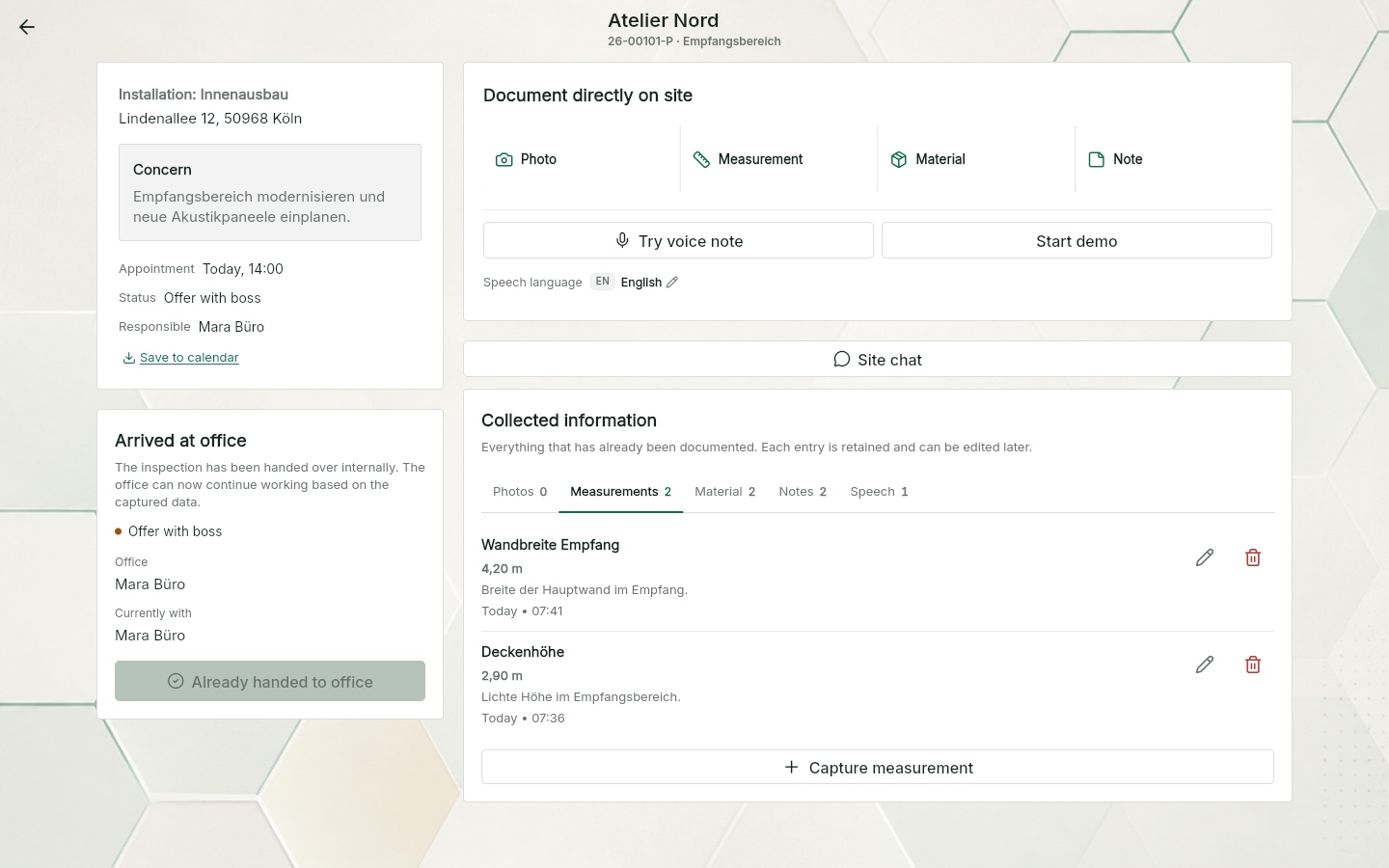
The technician captures everything during the site visit: photos, measurements, materials and notes, or simply as a voice note the AI sorts out. Seconds later, the office works with the same data. No paper notes, no photos buried in a chat.
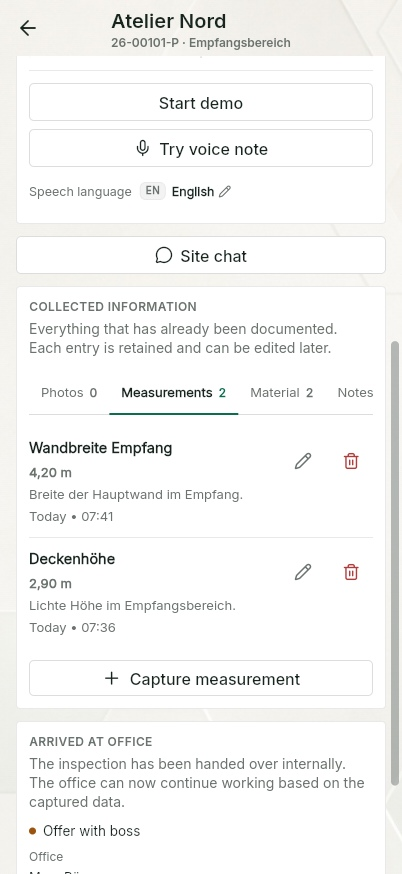
Live from the app
The technician stands in the room, documents with four tiles or one voice note, and seconds later the office works with sorted entries.
Work, materials and measurements in one sentence. The AI turns it into entries on the right project.
Photo, measurement, material, note. Every entry with timestamp and author on the job.
Sorted into tabs instead of scattered chats. The quote is built from the same data.
Why on the project, not in a chat
After a site visit, the knowledge about a job is often spread across five places: photos on someone's phone, measurements on a scrap of paper, materials in someone's head, agreements in a chat thread and the rest in memory. When the quote is written, the one detail that gets expensive is exactly the one that is missing.
QuickQuote files everything directly on the project. Every entry has a timestamp and an author, and the office sees the same state as the site. The photo documentation is part of the complete job management software: the same data later drives editable quote and invoice drafts as well as the job itself.
Captured on site
Six kinds of entries, all on the project. Captured in the order the site delivers them, not in the order of a form.
Existing situation, details, problem areas. Pictures stay with the project and are instantly findable in the office later, instead of sinking into a camera roll.
Wall width, ceiling height, length of a cable run: measurements are recorded with a description and are ready when the quote is written and material is ordered.
Whatever is to be installed or is needed on site lands on the project as a material entry, with quantities.
Customer wishes, technical pointers, anything unusual about the site. Written down in seconds instead of memorised until knocking-off time.
Talk instead of type: the AI turns a voice note into structured tasks, measurements, materials and pointers.
Plans, data sheets or existing paperwork are attached to the project as files and are within reach for everyone involved.
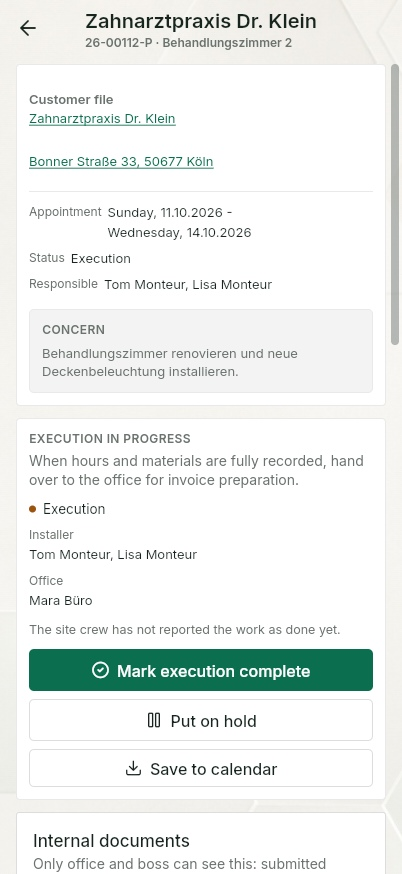
The handover
Once the site visit is finished, the technician hands over to the office in a single step. The basis for the quote is waiting there, already sorted: measurements, materials, notes and photos in tabs, plus open points and working notes.
Nothing needs chasing by phone, nothing has to be pieced together from a chat thread. On request, the AI creates a summary of the whole site visit as the starting point for the quote from site data.
Site chat in the web app
Photos, measurements and materials remain structured project records. In site chat, you can also clarify questions and arrangements with text and one photo per message.
Available in the current web app. In the mobile apps, availability depends on the installed store version.
How site chat worksOne idea, many names
Whatever it is called in your business, it almost always means the same thing: recording the current state of the site so that quote, execution and invoicing can build on it. QuickQuote does not turn that into a marathon of forms. It gives you six fast ways to capture entries on the project, with timestamp and author on every one. The traceability of a site diary comes about as a by-product, while the work gets done.
Photos, measurements and materials remain structured project records. In site chat, you can also clarify questions and arrangements with text and one photo per message.
A group chat mixes jobs, versions and replies in one timeline. Months later, finding the approved photo, exact measurement or person responsible becomes guesswork. Project documentation keeps the context attached.
It supports quote and invoice drafts, job preparation, material questions, handovers, evidence of completed work and later customer queries.
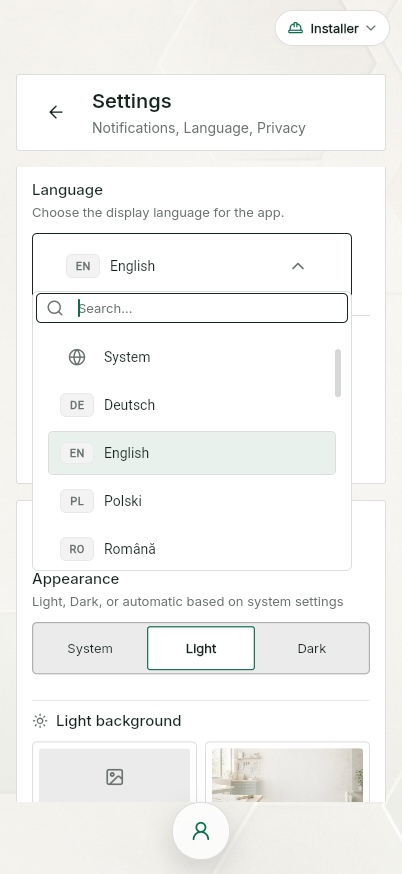
25 app languages
More than one language is spoken on most sites. In QuickQuote, everyone records their notes in their own language, from Polish to Romanian. The AI structures the entries, and the office reads them in the company language.
That way international teams document everything properly, instead of clearing up only the essentials by shouting across the site. The language barrier disappears from the documentation. The information does not.
Frequently asked questions
Photos of the existing situation and of details, measurements, materials, the work that was discussed, anything unusual about the site and open questions. In QuickQuote all of that sits on the project, with timestamp and author, instead of being scattered across chats and paper notes.
QuickQuote documents the site visit and the execution phase on the project, in a traceable way: who recorded what, and when. Whether that satisfies the formal site diary requirements of your specific contract depends on the contract itself. As day-to-day site documentation for trade businesses, that is exactly what it is built for.
Photos, measurements and materials remain structured project records. In site chat, you can also clarify questions and arrangements with text and one photo per message.
A group chat mixes jobs, versions and replies in one timeline. Project documentation keeps each photo, measurement, material entry and note with the job so the office can find it later.
You speak what you see: work to be done, materials, measurements, things to keep in mind. The AI turns it into individual structured entries and files them on the right project. Instead of typing everything up in the evening, you only review the result.
The complete basis for the quote: photos, measurements, materials and notes neatly organised in tabs, plus open points and working notes. On request, the AI summarises the whole site visit.
It supports quote and invoice drafts, job preparation, material questions, handovers, evidence of completed work and later customer queries. The original entries stay traceable on the project.
Everyone chooses their own app language. QuickQuote Pro adds AI voice notes in the installer's language and translation.
Yes. The mobile apps buffer new entries locally and synchronise them as soon as you are back online. Nothing gets lost in the basement or on a bare shell.
Both, following the same pattern. The technician captures the basis during the site visit, and the installer documents the work carried out, materials and hours on the same project during execution.
Keep reading
Create editable drafts and PDFs in QuickQuote or take in existing quote and invoice PDFs, then track approval, sending and payment follow-up.
Learn moreRecord start, end and breaks on site, get signatures on the spot and have the boss approve the hours.
Learn moreFrom site visit to invoice PDF and payment status: directly in QuickQuote or alongside existing systems.
Learn moreSee it first. Then decide.
No installation and no account required. Capture photos, measurements and a voice note in the demo.
App views use this language. Example names, project data and sample PDFs may remain in German.