
Schedule sites and installers
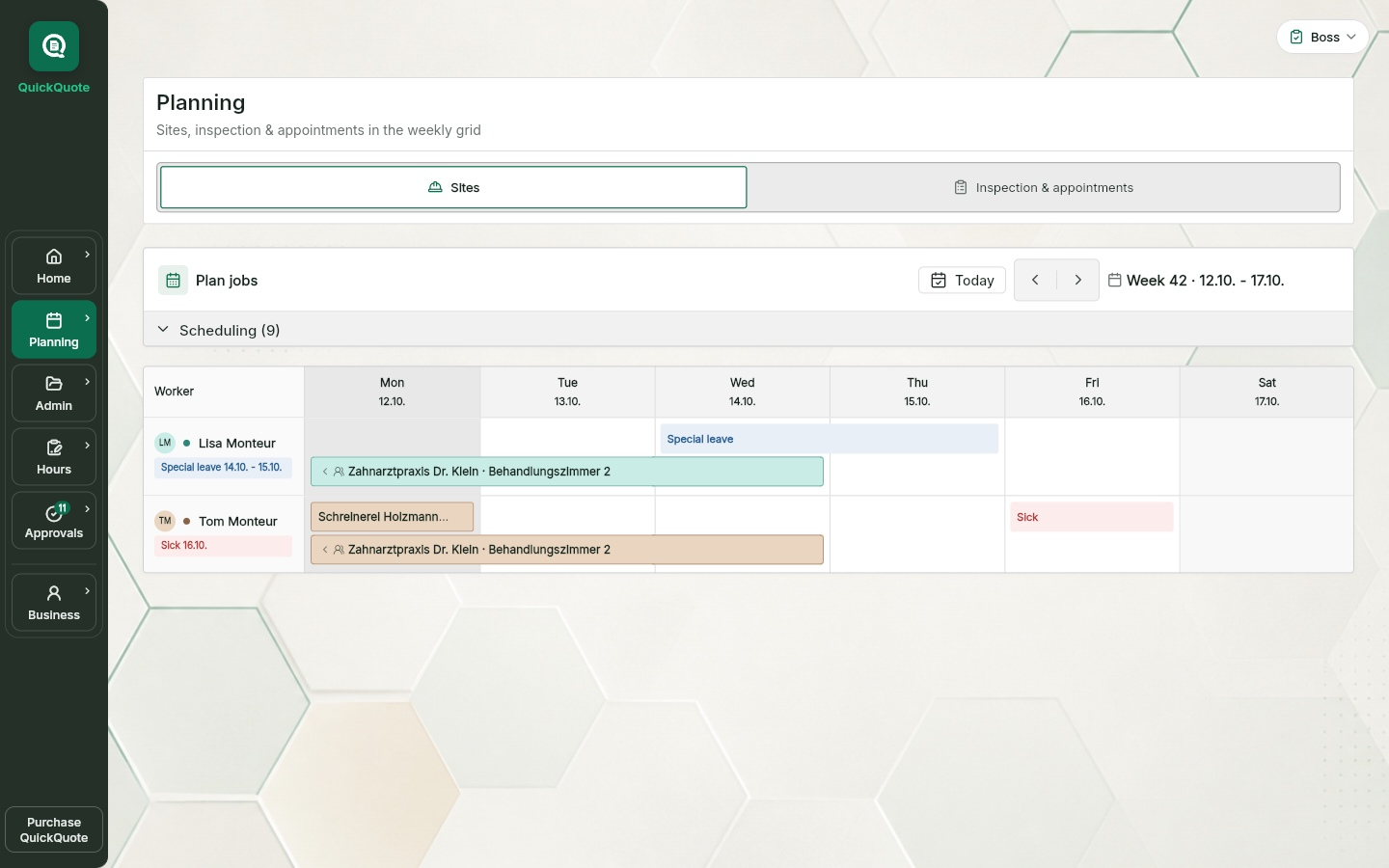
A week plan with one row per installer and one column per day. Next to it the tray with everything that has no date yet. Dragging sets period and assignment in one move.
QuickQuote Job Scheduling
Job scheduling for trades in the browser. Create a job site, drag it onto a day, add a crew, set the customer appointment. Your installers see their jobs on the phone and book their hours right there. For up to ten people including the owner.
QuickQuote Job Scheduling
A week plan with one row per installer and one column per day. Next to it the tray with everything that has no date yet. Dragging sets period and assignment in one move.
The installer books start, end and break on the job, the day is preset from the week plan. Send to the office, the boss approves or returns it with a reason. Free time tracking
Vacation, sick leave and special leave sit as a bar in the person's row. Whoever schedules someone on an absence day gets a prompt. Vacation planning for trades
The time clock is free too: clock in and out on a compatible Datafox terminal, on a tablet with a PIN or in the app on your company network. Compare attendance and booked project hours during approval and in the monthly overview. Project hours are booked separately on the job. Explore the free time clock
Up to ten people including the owner. Boss, office and installers, distributed as you like. Open invitations count. You sign up in the browser, confirm your email address and your business status; every invited person gets their own account.
No trial and no subscription that starts by itself. Scheduling, time tracking with the time clock, timesheets, manual material recording and absences run without Pro. The wall display, site visits, quotes, invoices and AI features are part of QuickQuote Pro.
How it works
Five moves and the week is set. Each of them stays attached to the job site.
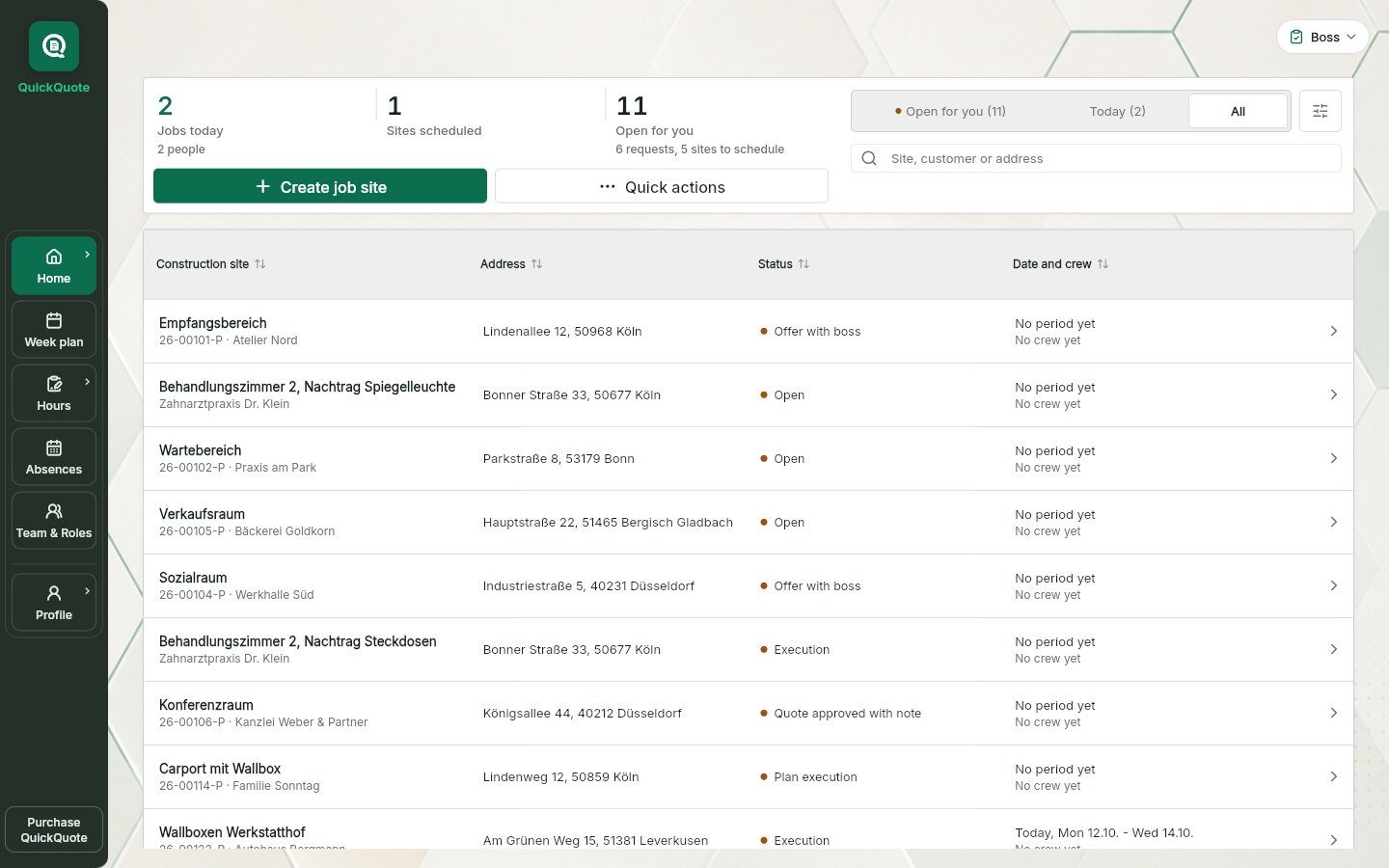
Name, address, customer, request. The site lands in the "Scheduling" tray next to the week plan.
Drag the card from the tray onto installer and day. Several days become one bar. At the end of the bar you drag the job longer or shorter.
Drag the site onto another installer and the plan asks: add, reassign or replace just this person. The date applies to the whole crew.
Set a time for the first day. The installer sees "At the customer at" on his day list.
Every plan change can be taken back straight from the message shortly afterwards. If someone else has planned in the meantime, their state stays.
Scheduling software for your installers
No second calendar, no whiteboard sync: every job hangs on the project, and whoever takes it has all the job data with them.
Jobs sit in the calendar with project, status and ownership. Site visits are an additional Pro feature.
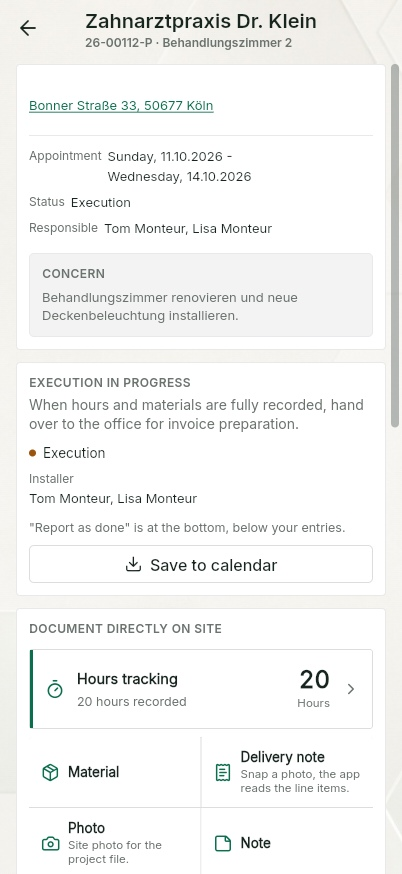
The day list on the phone shows their jobs with address and the time at the customer; contact and request are on the job.
Recorded hours return to the office for approval and stay traceable to the project.
Planning knowledge
A job is more than a time slot. The appointment must carry the project context with it.
Shift planning answers who works when. A trade job also needs the site address, work scope, visit notes, planned material, responsibility and current status.
When the calendar and the project folder are separate, the installer calls the office for context. QuickQuote keeps the appointment, project, owner and job data connected.
Typical friction
Usually not in the plan itself, but because the plan and the job information live in different places.
The installer arrives and calls the office because the work scope is not attached to the appointment.
One plan is in the calendar, one on the whiteboard and the latest change in a message.
What actually happened on site returns on paper, by voice message or not at all, so the invoice is rebuilt from memory.
Only the person who attended knows whether the job is complete, partial or waiting for another visit.
The week plan in detail
A multi-day job is one bar across the days, with one label. Absences and jobs of a person sit in lanes, so a bar stays at the same height on every day. Public holidays follow your company’s country and region. A click on an empty cell creates a stand-alone appointment without a site. On phones and compact tablet screens, the day view shows the same jobs per day.
The menu on the job:
QuickQuote Pro
The wall display shows the week plan on a screen in the workshop or break room, without login, read only, revocable at any time. It is part of QuickQuote Pro.
The screen is deliberately not a second planning tool. The owner, boss and office continue to schedule and change jobs inside QuickQuote with their role permissions. The wall display only reads that plan, refreshes automatically and cannot change anything.
From office to site
Whoever is in the plan has it all: address, contact, request, hours and timesheet. And the absences sit right next to it.
Whoever is on the site is in the plan. Crews share the date.
Address, contact, request and status are on the job on the phone.
Start, end, break, day preset. Send to the office, done.
Per site as PDF, signed by installer and customer on site. Create timesheets with the app
Vacation, sickness and special leave sit in the person's row, with a prompt when scheduling. Vacation planning for trades
Subscription link per member for Google Calendar, Outlook or Apple Calendar, read only.
Your guide
After sign-up Quey walks you through the free core step by step: set up the company, invite the team, plan a site, record and check hours, create a timesheet. At every step Quey waits until you have actually done it. The tour runs once; afterwards you find help under Profile or Business.
Calendar subscription
Under Account every member creates a personal subscription link and adds it to Google Calendar, Outlook or Apple Calendar. The instructions are right in the app. Jobs and absences then show up there, read only: QuickQuote remains the source. The link works like a password; you can regenerate or revoke it at any time.
When you need more
Site visit with photos and voice notes, quote drafted from the site data, boss approval, invoice draft from quote and approved hours. The planner stays the same, so does your team. Job management software for trades
Keep the appointment, owner and project information visible together.
The installer accesses the relevant job information on mobile.
Completed work, materials, hours, photos and notes stay with the job.
In Pro, approved job data supports an editable invoice draft; create the PDF in QuickQuote or take in an existing invoice PDF.
The installer app
The day list with his jobs, day by day. On the job: address, contact, request and "At the customer at". Below it the buttons Hours, Timesheet and "Mark construction complete". An empty day says "Day off".
He only sees sites he is assigned to. On the free plan he needs his own account and an available team place.
Also for mixed teams: App language and company language are set separately. So one person can use the app in Polish while the timesheet labels stay in German. AI translation of your own text and dictation are part of Pro.
Clear boundary
The focus is project work, not staffing levels and rotating shift patterns. Every job stays connected to a project.
The appointment is created from the project, so no separate plan needs to be reconciled with a job folder. Your jobs reach your calendar through the subscription link, read only.
Scheduling, hours and absences work directly in QuickQuote. Pro adds documentation, quotes and invoices. You can optionally take in existing quote and invoice PDFs. Explore the job management workflow.
Nothing. Week plan, jobs, crews, customer appointments, absences, time tracking with the time clock, hour approval, timesheet PDF and manual material recording are free for up to ten people including the owner. You enter no payment details.
There is no trial and no subscription that starts by itself. The free planner is the core of QuickQuote, not a trial month. Any change to the free access is governed by the terms, with notice by email and the chance to export your data.
The limit applies to the whole company: one owner plus up to nine more people, open invitations count. From the eleventh person you need QuickQuote Pro. Pro is 89 EUR a month plus VAT for the owner and two team licences. Up to ten installers per company are included, further seats are added per role. The switch happens in your existing company account; on the pricing page you can compare free and Pro.
Yes. Scheduling, time tracking with the time clock, manual material recording and absences run without Pro. Pro adds the wall display, site visits, quotes, invoices and AI dictation. The free planner is not a trial that runs out; if and when you switch to Pro is your call, for example with Pro from site visit to invoice.
QuickQuote uses encrypted transfer and role-based access. Database and server-side functions are set up in European regions; individual services may also process data outside the EU. Providers and safeguards are listed in the privacy policy and the DPA. The company accepts the DPA at sign-up.
They see their assigned jobs and relevant project details, record their own hours and manage their own absences. The office and the boss schedule jobs and review time entries. Every person signs in with their own account.
During setup, enter the business working hours and annual vacation entitlement. Individual employees can have their own working days and entitlements. Vacation calculations use the work schedule valid on each date and the selected public-holiday region. Staff can request vacation or report sickness.
A trade appointment belongs to a job: the site, address, description and assigned people stay connected. Shift planning mainly allocates working time and staffing levels. QuickQuote connects job scheduling to the hours actually recorded on the project.
Yes. Each person chooses their own app language. The company language controls timesheet labels and new team invitations. Text written by users stays in its original language on the free plan. AI translation and dictation are part of Pro.
The shared plan, invitations, approvals and confirmed synchronisation need an internet connection. Mobile apps can temporarily buffer supported entries. In the browser, wait for confirmed saving before closing or reloading the tab.
Continue the workflow
Book project hours on the job and record attendance with the time clock. Boss approval, timesheet PDF with signature.
Free time trackingVacation request, sick leave, special leave, vacation account.
Vacation planning for tradesCompare free and Pro.
Pricing: free planner, Pro from 89 EURStart with your next working week
Register your company, invite the team, drag the first site onto a day. No payment details.
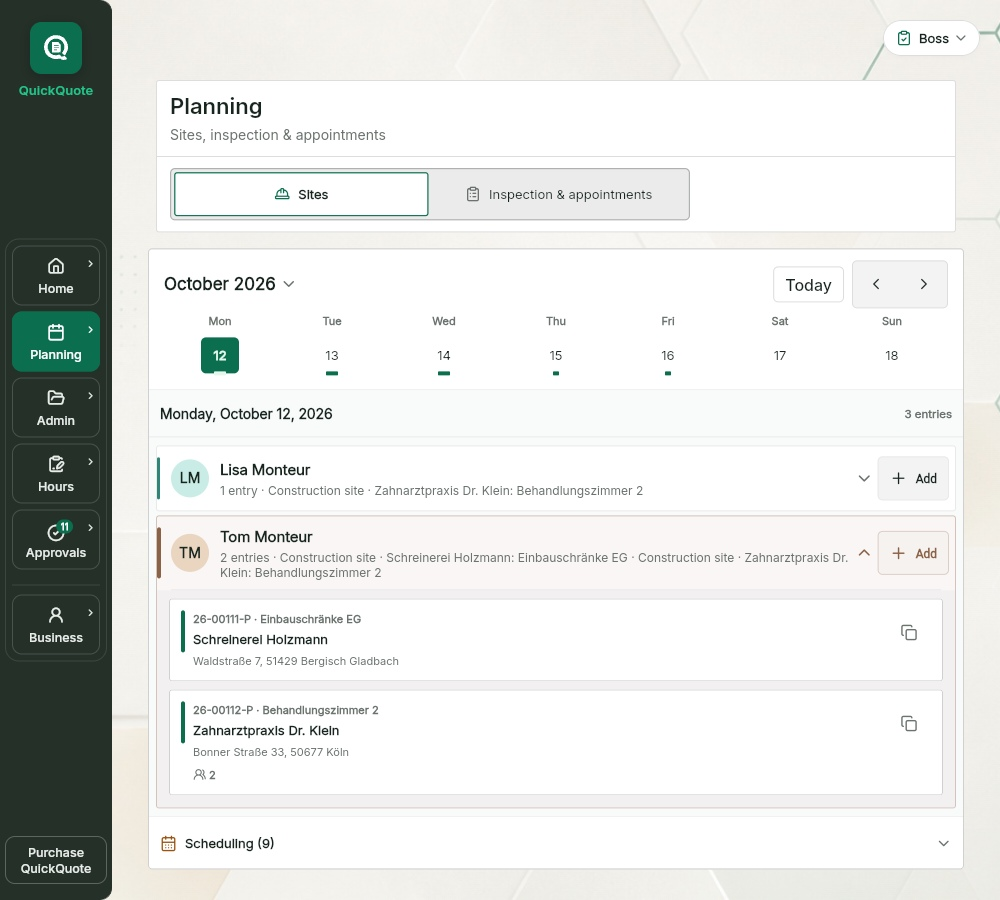
App views use this language. Example names, project data and sample PDFs may remain in German.